Posts

Run two/more Apache tomcat servers in your machine at the same time

Image
If you have currently configured a single tomcat server and you need to add more tomcat servers, first remove the CATALINA_HOST environmental variable. The configure more tomcat servers in new ports. ( How to change the Tomcat running port ) Now go to Command Line. Go to the first tomcat server directory through command line and go to bin directory. Type "startup" and execute Tomcat. Then your tomcat server will start. Now go to the next Tomcat server dirctory through cmd and as same as the first one execute it through command line. Here as we haven't created CATALINA_HOME variable , we can not execute Tomcat straghtly double clicking startup.bat file. So when we execute Tomcat from cmd, it creates required environmental variables at that time and starts tomcat.

How to change Apache Tomcat running port

Go to conf folder of your apache tomcat installation. Open server.xml file. Method 1 Search for (Ctl+F) "Connector port" key word there. In the first matching occurence change the port value to the value which you wish. For better accuracy make sure the current port value in the first matching occurence is equal to the port which the tomcat currently running. restart tomcat. Method 2 Find the port which tomcat currently running. Search for (Ctl+F) the current port in server.xml file and change it to the value you want. restart tomcat.

AXIS2 Web Service in eclipse through Top Down Approach-java.lang.RuntimeException: Element QName is null

Image
Based on this tutorial, But used my own WSDL file. I used Top Down approach where to create java codes from the WSDL file. But at “Axis 2 Web Service Skeleton Java Bean Configuration” wizard window I clicked next and there occurred an exception as follows saying Element QName is null. SOLUTION Add the following XML element within tags and inside tag which has a wsdl:fault (Particular operation should throw an exception). So I had to add, It appears as follows, <binding> <operation name="GetBalance"> <operation soapaction="http://it4110.itfac.mrt.ac.lk/2010/074005N/GetBalance"></operation> <input /> <output> </output> <fault name="fault"> <fault name="fault" use="literal"></fault> </fault> </operation> </binding> Here the getBalance operation throws...

Axis 2 web services in eclipse: Exception java.lang.NoClassDefFoundError: org/apache/http/HttpResponseFactory thrown when Services link clicked

I created the web service using axis2 and deploy through tomcat in eclipse following a Tutorial . Then axis2 homepage get displayed OK. But when the Services link clicked an exception page will get displayed as follows. type Exception report message description The server encountered an internal error () that prevented it from fulfilling this request. exception javax.servlet.ServletException: Servlet.init() for servlet AxisServlet threw exception org.apache.catalina.valves.ErrorReportValve.invoke(ErrorReportValve.java:102) org.apache.catalina.connector.CoyoteAdapter.service(CoyoteAdapter.java:298) org.apache.coyote.http11.Http11Processor.process(Http11Processor.java:857) org.apache.coyote.http11.Http11Protocol$Http11ConnectionHandler.process(Http11Protocol.java:588) org.apache.tomcat.util.net.JIoEndpoint$Worker.run(JIoEndpoint.java:489) java.lang.Thread.run(Unknown Source) root cause java.lang.NoClassDefFoundError: org/apache/http/HttpResponseFactory org.ap...

AXIS2 web service in eclipse: Web Service created, but when executed HTTP Status 404 page get displayed

Web Service project name= SimpleATMService http://localhost:8080/ATMService/ : HTTP Status 404 page SOLUTION Try This URL: http://localhost:8080/ATMService/axis2-web/

Add HTML, JavaScript, or any other codings into blogger posts

Image
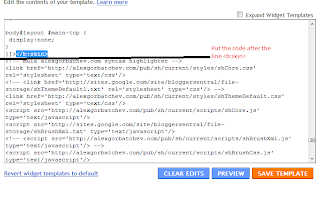
First you need to add some HTML content to your blog. For that go to Design tab---> Edit HTML Inside the Edit Template add the following code inside it's existing <head></head> tags. You can copy and paste the following code to the end of header codings. Here is the code that need to be added. <!-- mula alexgorbachev.com syntax highlighter --> <link href="https://alexgorbatchev.com/pub/sh/current/styles/shCore.css" rel="stylesheet" type="text/css"> <link href="https://alexgorbatchev.com/pub/sh/current/styles/shThemeDefault.css" rel="stylesheet" type="text/css"> <script src="https://alexgorbatchev.com/pub/sh/current/scripts/shCore.js" type="text/javascript"> <script src='http://sites.google.com/site/bloggersentral/file-storage/shBrushXml.txt' type='text/javascript'/> <!-- <script src='http://alexgorbatchev.com/pub/sh/curre...

Custom WSS components

Image
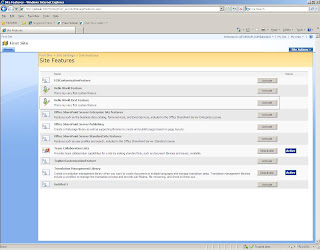
Although it is a great job by WSS sites which you create through the browser, there is a point where you would need to create custom features like web parts, workflows, event handlers  which fit to your requirements. For this surely you would need coding fro custom WSS components. WSS Features It is better to learn from the WSS features. Features provide the mechanism for defining site elements and adding them to a target site or site collection through a process known as feature activation. The element types that can be defined by a feature include menu commands, link commands, page templates, page instances, list definitions, list instances, event handlers, and workflows. Your first WSS Custom feature Start Visual studio Create a new C# class library DLL project named "HelloWorld" (New Project---ProjectType=Visual C#---Template=Class library) Before creating the feature.xml file, consider that the files for this feature must be deployed in their own special dire...