Posts

Customizing Lifecycle states in WSO2 API Manager

Image
WSO2 API Manageris a 100% open source API Management solution inluding support for API publishing, lifecycle management, developer portal, access control and analytics. APIs have their own life cycle which can be managed through WSO2 API Publisher while enabling many essential features for API Management, such as, Create new APIs from existing versions Deploy multiple versions in parallel Deprecate versions to remove them from store Retire them to un-deploy from gateway Keeps audit of lifecycle changes Supports customizing lifecycles  The ability to customize API life cycle provides a greater flexibility to achieve various requirements. There are few extension points available for customizing the API Lifecycle. Find more details about those from the product documentation [1].  Adding new lifecycle state Changing the state transition events Changing the state transition execution (In each state transition, we can configure an execution logic to be run) ...

Encrypting passwords in WSO2 APIM 2.0.0

Image
WSO2 products support encrypting passwords which are in configuration files using secure vault. You can find the detailed documentation form here of how to apply secure vault to WSO2 products. This post will provide you the required instructions to apply secure vault to WSO2 APIM 2.0.0. 1. Using the automatic approach to encrypt the passwords given in XML configuration files. Most of the passwords in WSO2 APIM 2.0.0 are in XML configuration files. Therefore you can follow the instructions given in here to encrypt them. 2. Encrypting passwords in jndi.properties file and log4j.properties files. As did in above section, the passwords in XML configurations can be referred in cipher-tool.properties file via Xpaths. Therefore cipher-tool can automatically replace the plain text passwords in XML configuration files. However, passwords in files such as jndi.properties file and log4j.properties filee need to be manually encrypted. Encrypting passwords in jndi.prop...

Dynamic Endpoints in WSO2 API Manager

Image
From WSO2 APIM 1.10.0, we have introduced new feature to define dynamic endpoints through synapse default endpoints support. In this blog article, I am going to show how we can create an API with dynamic endpoints in APIM. Assume that you have a scenario where depending on the request payload, the backend URL of the API differs. For instance, if the value of "operation" element in the payload is "menu", you have to route the request to endpoint1 and else you need to route the request to endpoint2. { "srvNum": "XXXX", "operation": "menu" } In APIM, dynamic endpoints are achieved through mediation extension sequences. For more information about mediation extensions refer this documentation. For dynamic endpoints we have to set the "To" header with the endpoint address through a mediation In-flow sequence. So let's first create the sequence which sets the "To" header based on the payload. Cr...

How to invoke APIs in SOAP style in Swagger

Image
WSO2 API Manager has integrated Swagger to allow API consumers to explore APIs through a interactive console which is known as 'API Console' This swagger based API Console supports invoking APIs i REST style out of the box. So this post going to show how we can invoke APIs in SOAP style in API console of WSO2 API Manager 1.7.0. For that we need to do few extra configurations. 1. Send SOAPAction and Content-Type header in the request 2. Enable sending SOAPAction header in the CORS configuration First create an API for a SOAP Service. In this example I am using HelloService sample SOAP service of WSO2 Application Server. This HelloService has a operation named greet which accepts a payload as below. <soapenv:envelope xmlns:soapenv="http://schemas.xmlsoap.org/soap/envelope/" xmlns:typ="http://www.wso2.org/types"> <soapenv:header> <soapenv:body> <typ:greet> <!--Optional:--> <name>lakma...

Troubleshooting Swagger issues in WSO2 API Manager

Image
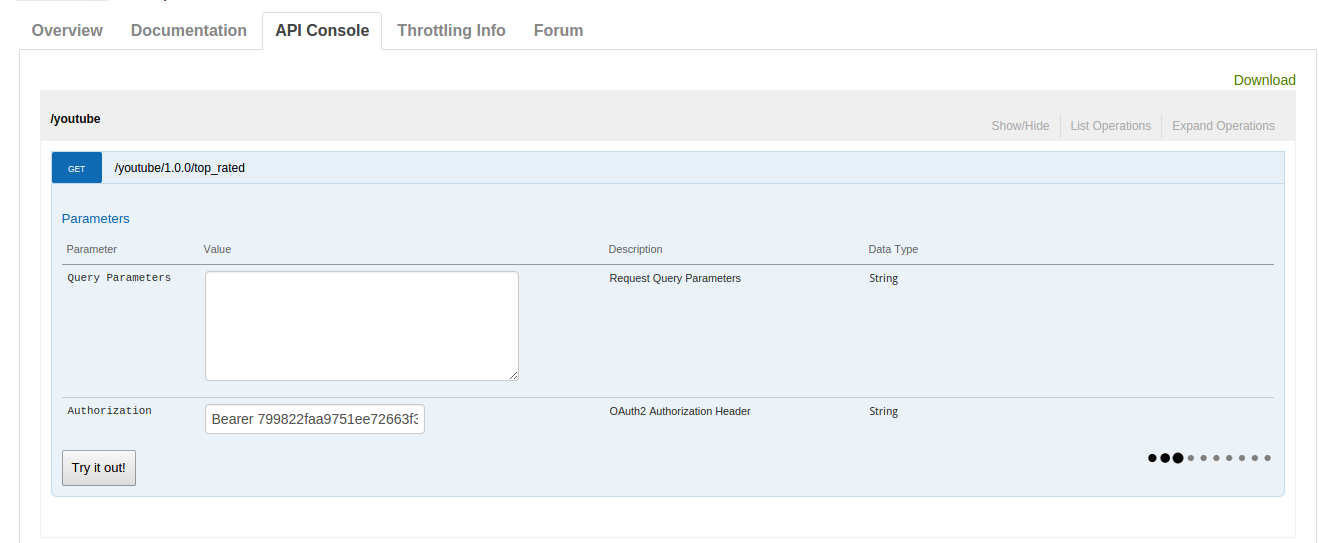
WSO2 API Manager provides this functionality through the integration of Swagger ( https://developers.helloreverb.com/swagger ). Swagger-based interactive documentation allows you to try out APIs from the documentation itself which is available as the "API Console" in API Store.  There are certain requirements that need to be satisfied in order to swagger Try-it functionality to work. First requirement is to enable CORS in API Mananger Store. This documentation describes how that should be done.  But most of them face many issues in getting the swagger Try-it into work. So this blog post describes common issues faced by users with Swagger and how to troubleshoot them.   Issue-1 API Console keeps on loading the response for ever as below. Cause -1 API resource not supporting OPTIONS HTTP verb.  Solution Add OPTIONS HTTP verb for API resources as below. Then Save the API and Try again.  Cause -2  Backend ...

Customizing workflows in WSO2 API Manager

Image
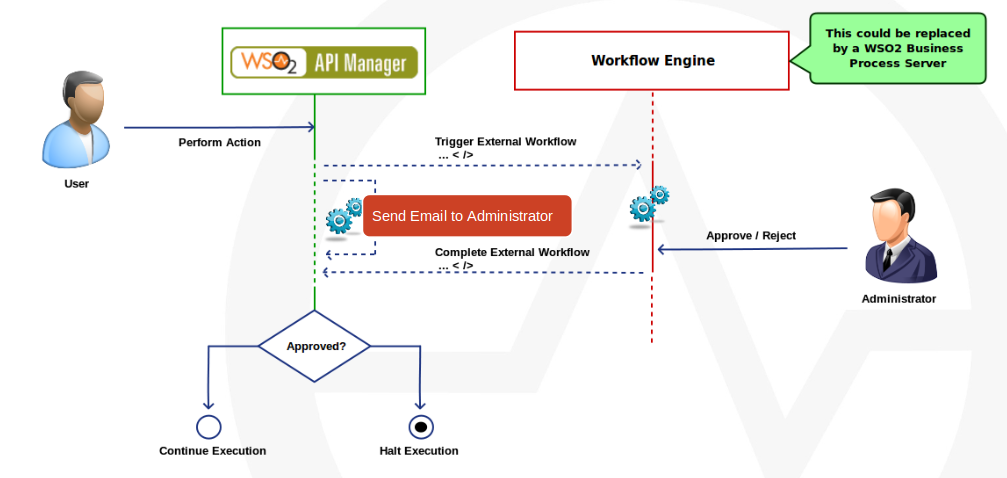
In WSO2 API Manager, Workflow extensions allow you to attach a custom workflow to various operations in the API Manager for User Signup Application Creation Application Registration Subscription By default, the API Manager workflows have Simple Workflow Executor engaged in them. The Simple Workflow Executor carries out an operation without any intervention by a workflow admin. For example, when the user creates an application, the Simple Workflow Executor allows the application to be created without the need for an admin to approve the creation process. In order to enforce intervention by a workflow admin, you can engage the WS Workflow Executor . It invokes an external Web service when executing a workflow and the process completes based on the output of the Web service. For example, when the user creates an application, the request goes into an intermediary state where it remains until authorized by a workflow admin. You can try out the default wor...

Migrating WSO2 API Manager 1.5.0 to 1.6.0

WSO2 API Manager latest version 1.6.0 got released recently. This post provides instructions on how to migrate your data from API Manager 1.5.0 to 1.6.0. If you had already used API Manager 1.5.0 and need to migrate your data to the latest version you can follow this. You can download WSO2 API Manager 1.6.0 from here . You can download the latest migration scripts from https://svn.wso2.org/repos/wso2/carbon/platform/branches/turing/products/apimgt/1.6.0/modules/distribution/resources/migration-1.5.0_to_1.6.0 Checkout the migration kit by executing below command. %> svn co https://svn.wso2.org/repos/wso2/carbon/platform/branches/turing/products/apimgt/1.6.0/modules/distribution/resources/migration-1.5.0_to_1.6.0 Shutdown AM 1.5.0 if it is running.  Backup your API Manager Databases of your AM 1.5.0 instance. Execute relevant sql script in migration-1.5.0_to_1.6.0 against your API Manager Database. (ex:If your database is mysql run mysql.sql against yo...