Posts

Boomi Mapping - Removing special chars from an input

Image
Dell Boomi mapping shape provides numerous ways to modify/enrich an input via functions. In this post I am going to show how I validated and removed special chars from an input using Scripting and do it along with another string function. The user defined functions available with mapping, allows us to apply sequence of functions to the input. In this example, I am going to use it. Use Case: I have two input strings coming from the source profile (first_name and last_name), which I want to first concatanate together and then remove non-alphanumeric characters if present. Solution In your map, add an User Defined function and add two inputs; first_name, last_name.  Add User Defined function into the map Added inputs to the user defined function As the first step, add a function "String Concat" under the  "String" category.  Specify first_name and last_name as the inputs. Also set a delimiter, if you need a one. In my case, I want to concatena...
Boomi Mapping - User Defined function based on list of elements in a collection

Image
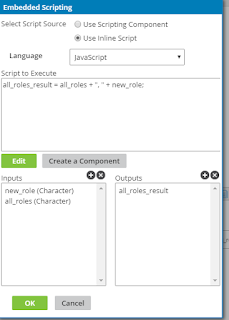
Recently I came across a requirement to validate all the elements in a collection and return an output based on that. Let me explain it with an example. I have a XML document containing information about users including a collection to indicate the roles of the person. Source Document <users> <user> <first_name></first_name> <roles> <role> admin </role> <role> subscriber </role> <role> creator </role> </roles> </user> </users> Destination Document I want to map this into a destination profile which has elements to indicate whther the user is an admin or a subsriber. <users> <user> <isAdmin> true </isAdmin> <isSubscriber> true </isSubscriber> <user> <users> </users> In order to achieve this I have to write a map funtion. But for a map funtion, we can't input a collection. If we map the "roles" collect...

Java Switch statements : Executing same code for two values without redundant code

This is something I learnt recently. Assume that you want to execute the same code when the switch variable value is one of multiple values. This can be dine without repeating the same code in multiple case statements. For example consider below code. There two case statements that check value for 3 or 4, executes same code block.  We can do this without duplicating the code. switch ( number ) { case ( 1 ): System . out . println ( "Number is 1" ); break ; case ( 2 ): System . out . println ( "Number is 2" ); break ; case ( 3 ): System . out . println ( "Number is 3 or 4" ); break ; case ( 4 ): System . out . println ( "Number is 3 or 4" ); break ; default : System . out . println ( "Number is not 1, 2, 3 or 4" ); break ; } See below. switch ( number ) { case ( 1 ): System . out . println ( "Number is 1" ); break ; case ( 2 ): System...

Java: Difference between Conditional and Bitwise AND operator - & vs &&

There two AND operators in Java that we can use. & - Bitwise AND operator && - Conditional AND operator. In Java both above operators can be used in if conditions. However there is a difference how each works. Let's see with an example. (x != 0) & (x > 1)  - With bitwise AND, it evaluates both (x !=0) and (x > 1) conditions. Then takes the AND of the two results. (x != 0) && (x > 1)   - With conditional AND, it first valuates (x !=0) and only if it is true, (x > 1) condition will be evaluated. Then takes the AND of the two results. If (x!= 0) was false, it simply returns false. What is the problem with using & in a condition? There are cases where we can only execute a condition only some other condition is true. See the example below. (x != 0) & (3/x  > 1) - This will throw an exception if the x=0. So for such cases we can only use &&. So in summary, it is always advisable to use conditional AND (...

Understanding Java-8 method references with examples

In my previous post , I described about Lamda expression and its usages. Now I am going to write about method references in Java 8. What is a method reference? As I described in my previous post , a lamda expression is an anonymous function. However, sometimes lamda expression is only calling an existing method. On the other hand, if the function code in the lamda expression is too complicated or has many lines, it makes sense to include it in a separate method. This is when method references comes in handy. Instead of writing a lamda expression, we can refer to an existing method. Based on the method type, there are 4 types of method reference syntax. Type Syntax Reference to a static method ContainingClass::staticMethodName Reference to an instance method of a particular object containingObject::instanceMethodName Reference to an instance method of an arbitrary object of a particular type ContainingType::methodName ...

Understanding Java Lamda Expression with examples

Lamda expression in Java was introduced in Java 8. This is one of my favorite, cool features of Java 8. This blog is intended to help understanding what is it, where and how can we use it. What is lamda expression? In simple words, Lamda expression in java is an anonymous function. It is defined with the parameter list and the function body. Below is the syntax of lamda expression. { parameter list } -> { function body } So what is actually meant by this definition? Although we define an anonymous function here, this is actually like an implementation to a method in an interface. Also, we can assign this lamda expression to a reference of the interface type. See example below. interface MyInterface { public String sayWelcome ( String name ); } public class LamdaExpSample { public static void main ( String args []) { MyInterface myIn = ( name ) -> { return "Welcome " + name ; }; } } ...

REST API Caching

REST APIs being exposed over HTTP mainly, there is a great advantage for APIs through HTTP Caching. Why caching is important for REST APIs?  Reduced server load, Low response time Save bandwidth The biggest gain through caching for REST APIs is reduced server load, because the clients can store a cached response for sometime in their local store and access it without hitting the server. So it will result in a low response time to the client making things faster for them. Further, using E-tags (Entity tags), clients have the ability to check with the server whether the response has updated or not. The response body is sent to the client only if the response has changed from what client has cached. Otherwise a 304 Not-Modified response is sent without a response body.  We'll discuss about ETags more later in this post. What to cache?  In your REST API, there can be data that doesn't change more frequently and also data that changes frequently. We can...

What is HTTP/2?

Not so long ago, I happened to do a research about HTTP/2 and how it affects performance of web services for my Masters. In this blog post, I am describing the basic details of the HTTP/2 protocol.  HTTP/2 the latest version of Hyper Text Transfer Protocol, is an optimized transport for HTTP semantics. Hence, it supports all the core features of HTTP/1.1 [1] . The aim of HTTP/2 is to be more efficient by addressing limitations of HTTP/1.1 [1] . There are 5 main features of HTTP/2. Multiplexing Header Compression Request prioritization Server push Binary message frames.  Connection establishment in HTTP/2 HTTP/2 also uses the same “http” and “https” URI schemas and same port numbers as HTTP/1.1. Therefore, implementations processing requests for target URIs with“http” and “https” should have a way to discover whether the next hop supports HTTP/2 or not. The determination procedure for HTTP/2 support is different for “http” and “https” URIs [1] . Start...

WSO2 API Manager- Customizing Store User Sign-Up

Image
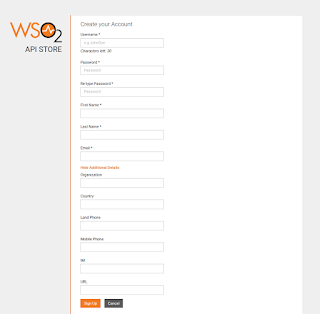
WSO2 API Manager allows on boarding new users to the API store through a Sign-up page. The default sign-up page has set of mandatory and optional fields for user to provide details. However, there can be cases where one needs to customize the available fields by modifying available ones or/and adding new fields. This can be easily achieved in WSO2 API manager since the fields are loaded dynamically from the user claim attributes. So this post explains how we can customize the default Sign-up page. By default API Store Sign-up looks as below. Note that this blog posts shows how to do this in APIM 2.1.0. Let's say you want to add a new field called 'City' to Store Sign-up page. This post provides step by step instructions on how to achieve this. 1. Start API Manager 2.1.0 and go to Management Console (https://localhost:9443/carbon/) 2. Go to Claims -> Add -> Add Local Claim 3. Enter the below values for the new claim. Claim URI :  http://w...

Customizing Lifecycle states in WSO2 API Manager

Image
WSO2 API Manageris a 100% open source API Management solution inluding support for API publishing, lifecycle management, developer portal, access control and analytics. APIs have their own life cycle which can be managed through WSO2 API Publisher while enabling many essential features for API Management, such as, Create new APIs from existing versions Deploy multiple versions in parallel Deprecate versions to remove them from store Retire them to un-deploy from gateway Keeps audit of lifecycle changes Supports customizing lifecycles  The ability to customize API life cycle provides a greater flexibility to achieve various requirements. There are few extension points available for customizing the API Lifecycle. Find more details about those from the product documentation [1].  Adding new lifecycle state Changing the state transition events Changing the state transition execution (In each state transition, we can configure an execution logic to be run) ...

Encrypting passwords in WSO2 APIM 2.0.0

Image
WSO2 products support encrypting passwords which are in configuration files using secure vault. You can find the detailed documentation form here of how to apply secure vault to WSO2 products. This post will provide you the required instructions to apply secure vault to WSO2 APIM 2.0.0. 1. Using the automatic approach to encrypt the passwords given in XML configuration files. Most of the passwords in WSO2 APIM 2.0.0 are in XML configuration files. Therefore you can follow the instructions given in here to encrypt them. 2. Encrypting passwords in jndi.properties file and log4j.properties files. As did in above section, the passwords in XML configurations can be referred in cipher-tool.properties file via Xpaths. Therefore cipher-tool can automatically replace the plain text passwords in XML configuration files. However, passwords in files such as jndi.properties file and log4j.properties filee need to be manually encrypted. Encrypting passwords in jndi.prop...